
Access Management for Managed Data Products
This is part 3 of my series on managed data products. Please find an introduction and an overview of the concept in this blog post
Regardless of whether analytics are centralized or distributed across business domains, data access is a major concern and needs to be taken care of. Such matters get even more important if business domains are involved with personally identifiable information (PII) or similarly sensitive data. We want to take a closer look at the setting of managed data products and what special requirements for access control - if any - arise from this scenario.
What’s Special About Managed Data Products
Depending on your point of view, not much really. To get a better feeling of possible differences in access control, let us compare two imaginary analytics solution:
John Doe’s Paper Company Incorporated
John’s company has 23 employees - most of them in sales. At least once every year, they need a breakdown of their achievements for their perfomance reviews. Apart from that, John requires reports to set and verify budgets, for tax purposes as well as for marketing. Max was hired to set up a simple analytics and reporting framework to cater towards any data needs. Max started by creating a script that generates excel files for individual employee performance which he sends out by mail whenever needed. Most of the finance and regulatory reporting was implemented in a BI Dashboard to which John and Max have access. One time, the finance department - well, James - desperately needed some information regarding the company’s spending for an official inquiry. Unfortunately, John was on holiday. But Max was helpful enough to grant access to James, who could not only find the required information on spendings in the dashboard but also all the salaries the company paid to each employee; he immediately scheduled a meeting to discuss a raise with John. But that was nothing compared to the mayhem which unfolded the following year, when Max left for a long hiking trip exactly two days before their provider switched on mandatory Two-Factor Authentication…
General Knowledge Limited
General Knowledge Limited is a foundation providing a platform to publish and share research among peers and the interested public. It is maintained by approximately a hundred employees scattered around the globe and contains articles of tens of thousands members across a vast variety of research areas. Of course, access control is actually part of the business model and can become quite complicated. There are different types of data and different reasons to get access to it. Articles for instance must be accessible to the team responsible for the platform’s content. Of course they should also be available to passive members that pay an annual fee to use the platform as a knowledge base. Furthermore, a new feature was introduced last month where an author can also waive any fees and give direct access on request to her articles. To manage this complexity, General Knowledge Limited makes use of best practices, such as role-based access and the Principle of Least Privilege. Therefore, not a single individual has any access tied to their individual profile. Instead, everyone is part of one or multiple groups and enjoys the collective access privileges of them. Consequently, there might exist multiple groups, all having read access to a specific article, but for different reasons, such as proofreading, paid or individually granted access or even authorship.
Interestingly, the makeshift way of John Doe’s Paper Company Incorporated usually goes a long way; especially for small companies. And depending on your needs, it might even make sense to spend your effort elsewhere unless you really need better access control. In the context of data products, however, this approach can become tricky quite fast. Moreover, there is one special aspect of managed data products, that makes solid role-based access indispensable:
A data product provider cannot — and should not — manage internal access for its customers
Let us investigate this statement to make it clearer. Assume that we deploy a decent amount of data products to a customer - say for instance John’s company. If access would be handled by us as the provider, we might get a request the next day from James to read data from one of the products. How would we know, if this access is required or within James’ competence? The only way we could make sure is to ask around in John’s company and even if we would get a positive response, do we as a provider want to take on this kind of respnsibility? At the very least, such an approach to access management is inefficient. Thus, we need to make sure, that a customer of managed data products can set up access himself. In the next part we are going to investigate how.
Hierarchical Access
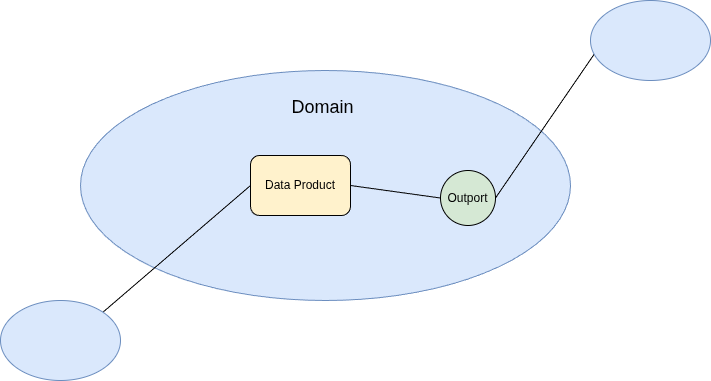
Recall the basic notion of a data product and its related concepts illustrated in the drawing below.
A data product is a self-sufficient, reusable package containing data and metadata that can be run and consumed independently of any other data products. Any data product contains at least one output port (or outport). An outport is a standardized interface or gateway that enables authorized consumers to access, query, or consume data. Different outports of the same data product offer different views such as filtered data or different output formats. Data products can be grouped into domains, which often correlate to business domains and the respective team in charge.
We need to give a customer the means to manage access on outport level, because that’s where the data actually resides. However, even in a simple setup of managed data products, there are likely hundreds of different outports and nobody wants to spend their days manually assigning people to them. To help with this, we can also offer a way to grant access for a data product as a whole including all of its outports. We can go even further and provide the same for domains. Especially if there are teams on the customer side, who are responsible for all data products in their domain, access can be granted with a single role. Of course, everyone having access to the domain can access all of its data products with all of their respective outports. There might be even a use case for an overarching “platform access” role, which grants a user privilege to all domains.
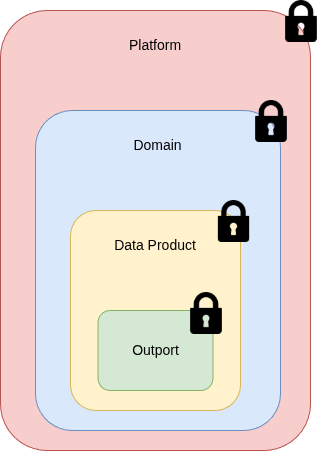
In other words, we want to have a generic hierarchy of access levels, which any customer can use to manage their data products individually. Two important points regarding this approach are:
- Flexibility Any access model can be set up with this approach. If a customer feels comfortable giving all the data to all of the employees, they can all be part of the one and only platform group. On the other hand, users can be given access to single outports only. Depending on the IAM solution at the customer, even complex approval schemes and time-limited access are within the realm of possibilities.
- Generic Roles Since the data product provider knows nothing of the customer’s access right management, any assumption about required roles are most likely wrong. Therefore, any combination must be taken into account. In other words, every outport, every data product and every domain will require a specific role which needs to be set up by default. This can result in quite a large number of security groups. Fortunately, these are usually quite lightweight objects.
Implementation in Microsoft Fabric
Of course, the hierarchical roles we just described above need to be defined in the IAM system of the customer. In our default setup, we assume customers to use Microsoft Fabric on the basis of Spark to make use of our managed data products. Since Fabric is closely related to the Azure platform, we furthermore offer support for access management via Microsoft Entra ID. Notice that Fabric comes with concepts that coincide naturally with the different abstraction layers of data products.
A data product can be mapped seamlessly to so-called workspaces in Fabric; this equality also helps enforcing the self-sufficiency of data products. To model outports, we use different lakehouses within the workspace representing the data product. On the other hand, workspaces can be assigned to Fabric domains (or even subdomains), being an exact match of data product domains. As mentioned before, we need to distinguish between the implementation of the abstraction layers and the access management. For instance, domain level access for managed data products is not designed to change or delete the domain itself but to consume all data within said domain. Thus all of the security groups will actually simply give read access to the outports - the lakehouses.
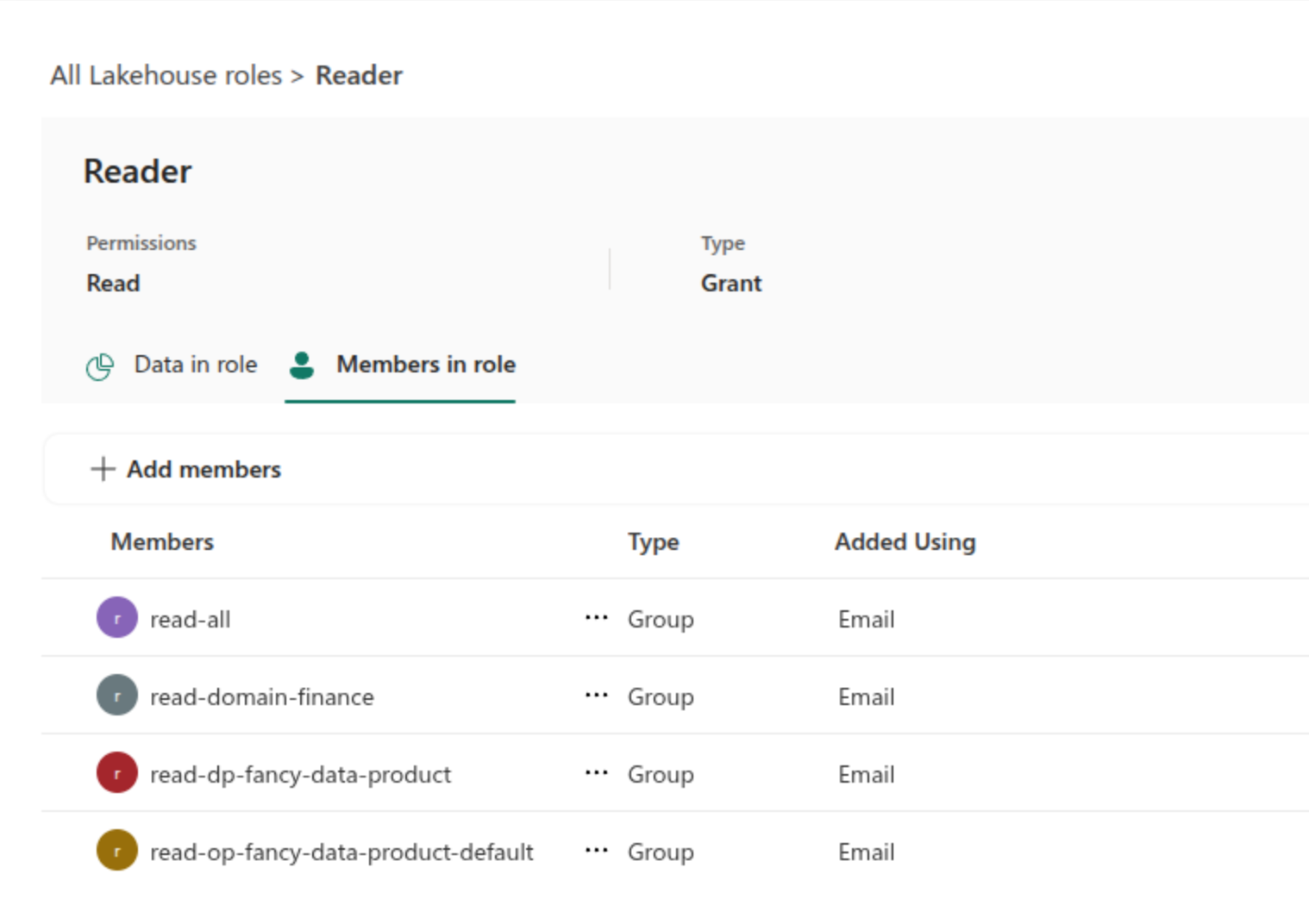
In the screenshot below, you can see a basic example for “fancy-data-product” within the “Finance” domain offering a “default” outport. In the lakehouse representing the default outport, there are four different security groups that offer read access. A group directly tied to the outport, one for the data product, another for the “Finance” domain and finally the platform access group for overarching access. Of course, the generation and attribution of these security groups is automated and performed during deployment.